
Last updated on
Oct 30, 2026
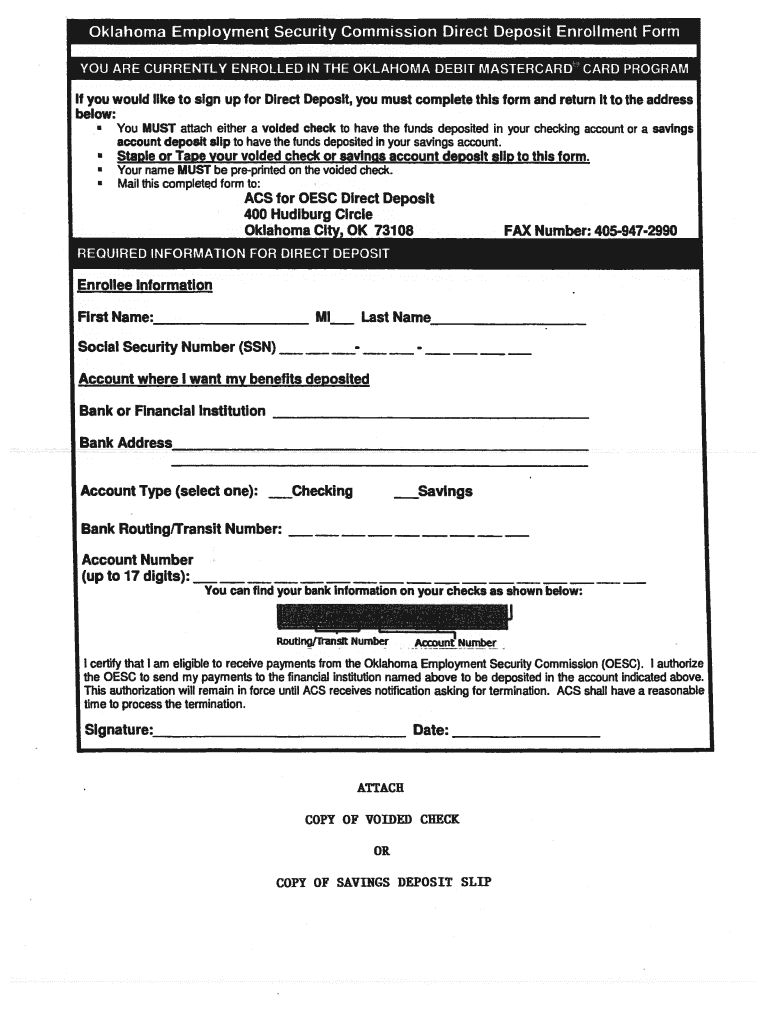
OK Direct Deposit Enrollment Form free printable template
pdfFiller is not affiliated with any government organization

Fill out
Complete the form online in a simple drag-and-drop editor.

eSign
Add your legally binding signature or send the form for signing.

Share
Share the form via a link, letting anyone fill it out from any device.

Export
Download, print, email, or move the form to your cloud storage.
Why pdfFiller is the best tool for your documents and forms


End-to-end document management
From editing and signing to collaboration and tracking, pdfFiller has everything you need to get your documents done quickly and efficiently.
Accessible from anywhere
pdfFiller is fully cloud-based. This means you can edit, sign, and share documents from anywhere using your computer, smartphone, or tablet.
Secure and compliant
pdfFiller lets you securely manage documents following global laws like ESIGN, CCPA, and GDPR. It's also HIPAA and SOC 2 compliant.
What is OK Direct Deposit Enrollment Form
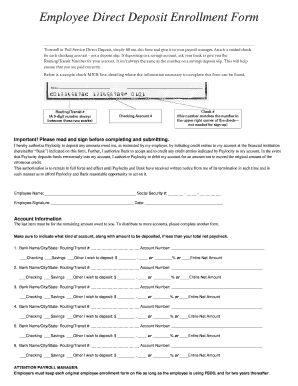
The OK Direct Deposit Enrollment Form is a document used by employees to authorize direct deposit of their paychecks into their bank accounts.
pdfFiller scores top ratings on review platforms




Free trial is very nice
Awesome sauce!!
Great
Best form app i ever used.
I was looking for a PDF system that I ciud use to fill out and sign documents that I could across platforms. This PDF FIller seems like the best and most reasonably priced app.
Awesome collaboration tool.
Great product
Who needs OK Direct Deposit Enrollment Form?
Explore how professionals across industries use pdfFiller.

OK Direct Deposit Enrollment Form is needed by:
-
Employees seeking direct deposit for wages
-
Human resources departments managing payroll
-
Financial institutions processing direct deposits
-
Payroll service providers handling employee payments
-
Freelancers who prefer direct deposit for payments
Comprehensive Guide to OK Direct Deposit Enrollment Form
What is the OK Direct Deposit Enrollment Form?
The OK Direct Deposit Enrollment Form is a crucial document designed for managing payments securely and efficiently. This form allows individuals to set up direct deposit for their accounts, which enhances payment processing speed and minimizes the risks associated with physical checks. Understanding its purpose can significantly improve financial management for many users.
Purpose and Benefits of the OK Direct Deposit Enrollment Form
This form is essential for ensuring a streamlined payment system. By utilizing the OK Direct Deposit Enrollment Form, recipients can enjoy several advantages:
-
Increased convenience by receiving payments directly to their bank accounts.
-
Faster payment processing compared to traditional check methods.
-
Reduced risk of check fraud, providing a layer of security for both recipients and payers.
Who Needs the OK Direct Deposit Enrollment Form?
The target audience for the OK Direct Deposit Enrollment Form includes various individuals who may need to complete this process. This includes:
-
Employees who want their salary deposited directly into their bank accounts.
-
Recipients of government benefits such as Social Security or unemployment.
-
Freelancers or contractors requiring direct payment for services rendered.
How to Fill Out the OK Direct Deposit Enrollment Form Online (Step-by-Step)
Completing the OK Direct Deposit Enrollment Form online involves several straightforward steps:
-
Access the form through the appropriate online platform.
-
Enter personal information including name, address, and Social Security number.
-
Provide bank details such as the routing number and account number.
-
Review the form to ensure all information is accurate.
-
Submit the form electronically or prepare it for mailing.
Common Errors and How to Avoid Them
When filling out the OK Direct Deposit Enrollment Form, it's easy to make mistakes that can delay processing. To minimize errors, be aware of the following common pitfalls:
-
Incorrect bank details, such as an erroneous routing number or account number.
-
Missing signatures or initials where required.
-
Omitting necessary personal information, which can lead to delays.
Double-check all entries to ensure completeness and correctness before submission.
Submission Methods and Delivery for the OK Direct Deposit Enrollment Form
Once the form is completed, it can be submitted through various methods. Users can choose how they want to submit their application:
-
Electronically via the designated online platform.
-
By mailing a printed copy to the appropriate address, ensuring it is properly stamped and addressed for timely delivery.
What Happens After You Submit the OK Direct Deposit Enrollment Form?
After submitting the OK Direct Deposit Enrollment Form, users can expect a specific processing timeline. Typically, the following occurs:
-
Confirmation notifications are sent upon receipt and successful processing of the form.
-
Users may track the status of their submission through the designated channel.
Security and Compliance for the OK Direct Deposit Enrollment Form
Security is a paramount concern when it comes to handling sensitive information on forms like the OK Direct Deposit Enrollment Form. This form employs measures such as:
-
256-bit encryption to protect user data during transmission.
-
Compliance with regulations like HIPAA and GDPR to ensure data privacy and security.
How to Leverage pdfFiller for the OK Direct Deposit Enrollment Form
Using pdfFiller enhances the process of filling out the OK Direct Deposit Enrollment Form. Key features include:
-
Easy access to eSignature capabilities for signing the form electronically.
-
The ability to create and edit forms to ensure all necessary details are included.
-
Secure storage of completed forms for future reference.
Next Steps for Successful Direct Deposit Enrollment
Once you've filled out and submitted the OK Direct Deposit Enrollment Form, the next steps are straightforward. It’s beneficial to:
-
Recap each step from filling out the form to submission to ensure everything is in order.
-
Consider utilizing pdfFiller for future forms to simplify the process further.
How to fill out the OK Direct Deposit Enrollment Form
-
1.Access the OK Direct Deposit Enrollment Form on pdfFiller by navigating to the platform's website and searching for the form in the search bar.
-
2.Once you find the form, click to open it in the pdfFiller editor. This will allow you to begin filling it out electronically.
-
3.Gather necessary information before starting, including your bank account number, routing number, and any additional details required by your employer.
-
4.Begin filling out the fields in the form, ensuring to input your personal information accurately, including your name, address, and contact details.
-
5.Use the pdfFiller interface to navigate through the form, clicking on each field where your information is required, and typing in the relevant details.
-
6.Review the information entered in each section to confirm its accuracy. Make sure that all fields are filled out completely and correctly.
-
7.Once you have completed all required fields, save your progress by clicking the save button. This will ensure all your data is stored in case you need to come back later.
-
8.After reviewing your completed form, finalize it by clicking the 'Finish' or 'Submit' button depending on how you plan to proceed.
-
9.Download the completed form for your records or submit it directly through the pdfFiller platform if your employer requires online submissions.
-
10.If you need a physical copy, select the print option from the menu. This allows you to print the form directly from pdfFiller.

Who is eligible to fill out the OK Direct Deposit Enrollment Form?
Any employee of a company that offers direct deposit payroll options is eligible to fill out this form to set up their direct deposit.
What information do I need to complete this form?
You will need your bank account number, routing number, and personal information such as your name, address, and employee identification number, if applicable.
How do I submit the completed OK Direct Deposit Enrollment Form?
You can submit the completed form directly through pdfFiller's submission options, or download and print it to hand in to your HR department.
Are there any deadlines for submitting this form?
It's best to submit your enrollment form before the next payroll period to ensure that your direct deposit begins on schedule. Check with your employer for specific deadlines.
What common mistakes should I avoid when filling out this form?
Ensure that all details are accurate, especially your banking information. Double-check for typos in your account and routing numbers to avoid processing errors.
How long does it take for the direct deposit to start after submitting the form?
Typically, it may take one to two payroll cycles after submitting the form for the direct deposit to begin, depending on your employer's processing times.
What should I do if I make a mistake on the form after submission?
If you realize there's an error after submitting, contact your HR department immediately to correct the information as quickly as possible.
Related Content
Related Forms


Related Catalogs
Get the latest insights from our blog



If you believe that this page should be taken down, please follow our DMCA take down process
here
.
This form may include fields for payment information. Data entered in these fields is not covered by PCI DSS compliance.